
Download free Slides from SlideShare in PDF/PPT format – No Login or subscription needed!
Are you a student, researcher, or teacher worried about SlideShare’s subscription charges and login details? I have a SlideShare Downloader tool that allows you to save SlideShare slides quickly and reliably. You have come to the right place at the right time.
With our slides downloader, you can save any presentations in PPT or PDF formats within seconds, with no sign-up or subscription required. Without hassle, you can access all types of slides or presentations at any time using this tool. Even after downloading, you can view these files offline.
Simple steps to download slides from SlideShare?
You are on a mobile device; it doesn’t matter whether you are using an iOS or an Android, because this downloader tool is capable for both devices. To download slides on a Smartphone, follow the simple steps provided below. If you still don’t understand, follow the screenshots step by step.
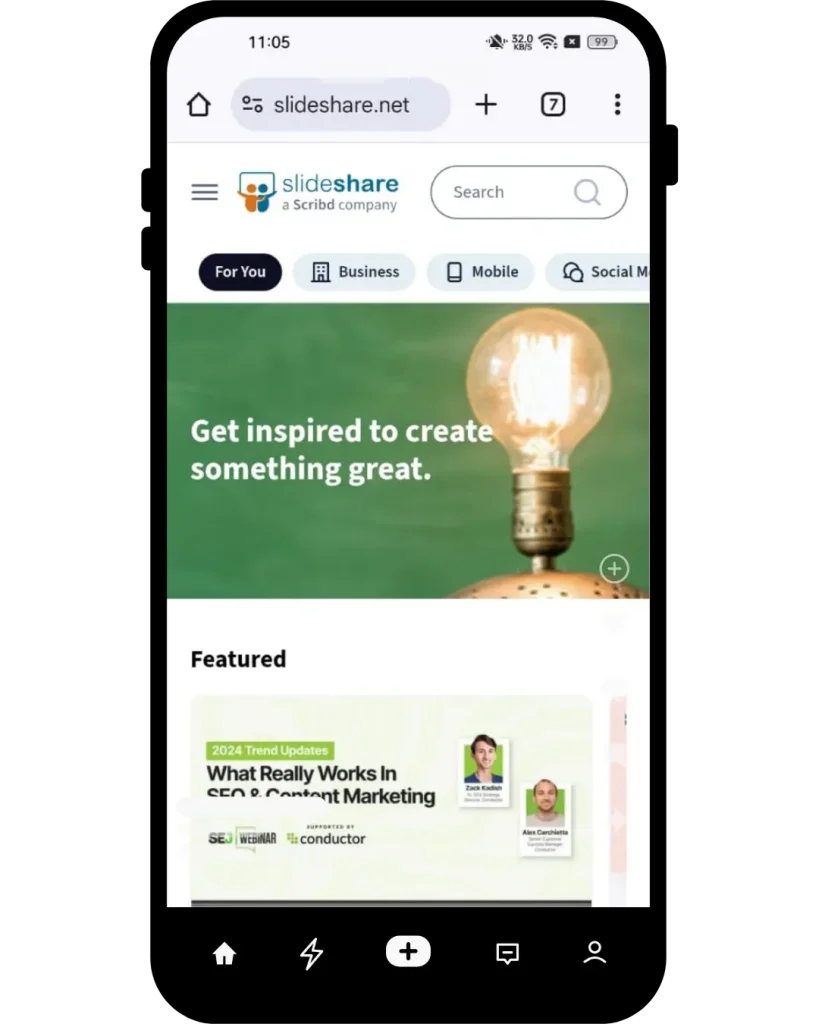
1. Find the URL
At the outset, go to the Slideshare website, and find the slide or presentation that you want to save to your device.

2. Pick the Slide URL
Now, copy the URL of that slide from the search bar of the SlideShare site at the top.
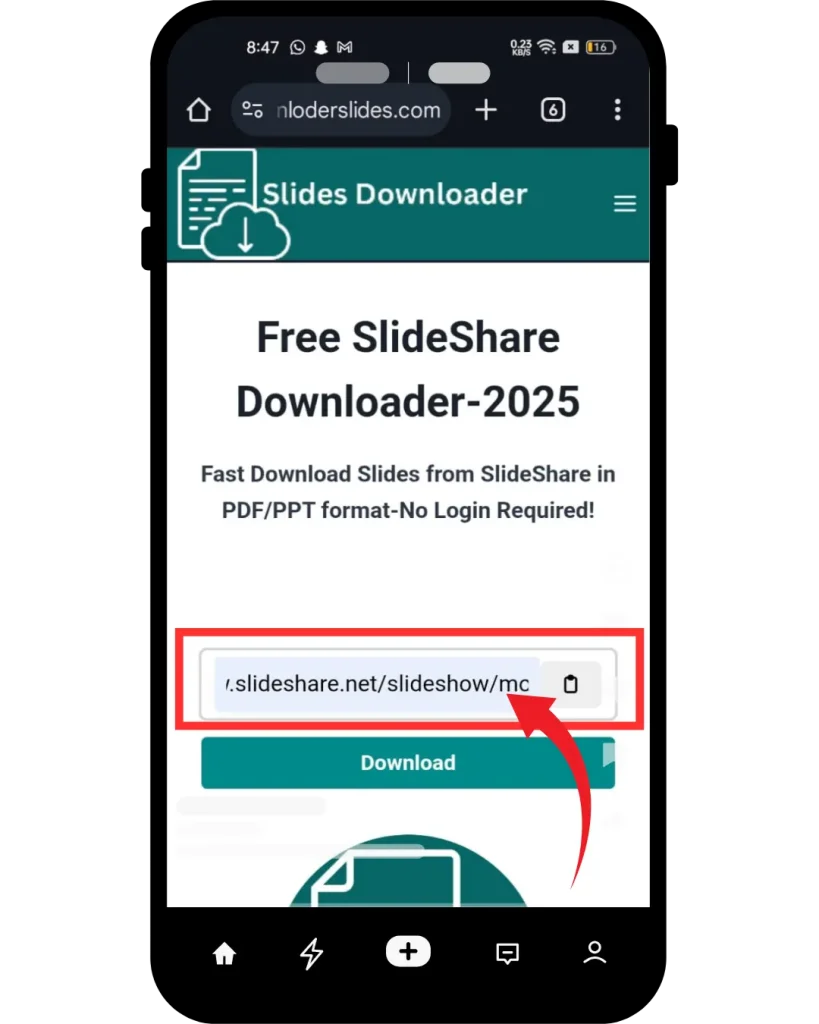
3. Paste Slideshare URL
Open our online tool, and paste the copied URL in the search bar — it’s as easy as pie!

4. Download Now
Select your preferred file format (PDF or PPT) from the provided options, then click the “Download” button. Your file will be ready in seconds!
How to use SlideShare downloader for Windows?
If you’re wondering whether this Slide downloader tool works on Windows or Mac, the answer is yes, it functions perfectly on both. It offers options to download Slides as PDF or PPT files. These are the steps to download SlideShare presentations on a laptop or PC. There’s also a YouTube video included to make it easier for you to download the presentations.
What is SlideShare Downloader Tool?
It is a user-friendly, web-based application that allows users to freely access to huge library of SlideShare files. Moreover, this tool is a completely free and direct downloader tool. No doubt, the most reliable tool for SlideShare PDF downloader or SlideShare PPT downloader.
Once the presentation is downloaded, you can save these files on your device for a lifetime, get easy access for offline viewing, and also share with anyone. We already wrote how you can download SlideShare slides on your mobile or Windows.
SlideShare presentation Downloader – Get Free (PPT, PDF, Doc)
SlideShare is a well-known platform, and most people use it for educational purposes. They paid charges to download material. We solved the problem and created a SlideShare downloader online tool, which allows you to download slides for free of cost. It is also known as PowerPoint or presentation downloader.
SlideShare allows users to download limited files for a month when you create a new account. After reaching the limit, you would pay to download files. Through our charismatic tool, you can download countless SlideShare slides, infographics, or presentations without paying any charges.
Key Features
It has multiple key features, which is why people prefer this downloader tool. It is a user-friendly and easy-to-use tool. Here are the following key features:

Unlimited Downloads
Plenty of tools are available on the internet, but they either have a limited number of downloads or require subscription charges. Woohoo! With our Slideshare downloader tool, you can download unlimited Slideshare files without any restrictions.

Compatible for All Devices
Most of the tools are compatible with only one device, like a laptop or mobile phone. Yes! our APK tool prefers all devices under one roof, including Computer, Android, IOS, MAC, or Tab. Users can download Slideshare content from any device using our tool.

No Watermarks
Most free downloader tools add a watermark on the downloaded content, which causes disturbance when reading the content. Our Online Slideshare downloader provides files without Watermark, making it a breath of fresh air for users.

Easy To Use
No special skills are needed to use this tool, you can download your favourite slides in a few seconds by clicking on the download button. This tool has a simple interface. Paste your required slide link after downloading you can save it directly to your device.

Free to Downloads
Yippee! You heard it right— It is a completely free tool. We display some ads to support our development, but no subscription fee is required for any users all over the world. Use and enjoy it. This amazing feature is the cherry on top for users.

No Login Required
There is no need to sign up to use this tool—how convenient! This amazing feature attracts users to directly download slides by simply pasting the URL. Unlike most tools that require logging in, which can be time-consuming.
What is SlideShare?
SlideShare is an American hosting service that launched in 2006. In 2012, LinkedIn acquired it. Over time, the popularity of SlideShare increased, and by 2020, the Scribd company officially became its owner. Slideshare is like a YouTube, but it has presentations in 40 different categories. For professionals, it supports various content types, including infographics, presentations, documents, and videos.
There are 25 million presentations available and 70 million-plus active users on SlideShare. Students, teachers, researchers, businessmen, and many others from different fields can benefit from SlideShare content. Moreover, it is the best platform for marketing and knowledge sharing, and you know what, users can also comment and share the content with others if it’s public. Sometimes it also happens that the uploader makes the content private.
Nowadays Slideshare is used for various tasks, whether professional, educational, or business-related purposes. Stay put and join us as we explore more features, pros, and cons of Slideshare.
Explore what Content SlideShare Offers to Users
Slideshare is an easy-to-operate social media platform and has a growing and active audience, which means your content will be seen by more people and receive more exposure. Slideshare offers a wide range of data such as presentations, infographics, videos, webinars, and documents to users. Now, we’ll explore the characteristics that Slideshare contains.
What’s new in SlideShare
After 20 years, SlideShare has seen a major change, which took place on September 24, 2025. In which the current logo was converted to a stylish logo, and along with this, the complete layout of the website has also been changed. The old ones used blue and orange, with blue as the primary color, dating back to the LinkedIn era, while the new logo has orange accents with white and off-black neutrals, giving it a modern feel.
Along with this, AI tools have also been included in SlideShare in the 2025 update. This AI will help to simplify the Slideshare presentation, rephrase the difficult words, and adapt according to the different users, like students or professionals. This is also in early development, but will gradually become available to all users.
Pros and Cons of SlideShare
Pros
Cons
How to Download and Save Slideshare Files?
A Guide to Using the Slideshare App
It is an American hosting service and is not highly technical, so users don’t need skills to understand it, making it easy for everyone to use. Slideshare is simple to grasp, so you don’t need to panic about how to use it. Go to the Slideshare website and sign up using your email or Facebook. Design your slide in PowerPoint software and upload it on Slideshare.
Remember, don’t overlook using a color scheme, fonts, title, and description before uploading your slides. At the end of the day, optimizing your content according to SEO can help it rank at Google #2 when searching.
Content offered by SlideShare for its users
SlideShare is an ocean of information, 75 million people, including researchers, educators, students, and businessmen, gain knowledge from the SlideShare regarding their respective topics. It is such an amazing Platform that shares updated information with its users daily. Experts share information in the form of Slides or Presentations
SlideShare does not cover one category but rather it covers more than 40 categories so that people from different professions can increase their insight. SlideShare does not compromise on quality and legitimacy.
The Categories that SlideShare Provides
|
Education |
Environment |
Entertainment |
|
Software |
Services |
Automotive |
|
Retail |
Lifestyle |
Travel |
|
Devices |
Internet |
Government |
|
Law |
Services |
Career |
|
Science |
Health |
Real Estate |
|
Leadership |
Management |
Accounting & Finance |
|
Self improvement |
Investor Relationship |
Spiritual |
|
Sports |
Technology |
Engineering |
|
Health Care |
Economy |
Art & Photos |
|
Marketing |
Technology |
Social Media |
|
Recruiting & HR |
Medicine |
Humor |
Personal Reviews
I was really impressed when I used this tool for the first time. The main thing is that it is offers unlimited downloads without any restrictions. Its ease of use, fast delivery, and 100% security maximize the tool’s reputation further. I also admire this downloader tool because it is compatible with all devices. No matter whether you are using a Smartphone, tablet, or desktop, it works perfectly.
I mostly use this tool for study and research purposes. There is no need to fill out CAPTCHA or add login details. This tool has been designed in such a way that it does not consume much time during the download process, thereby saving me time. And I don’t even have to pay any subscription charges when downloading the Slideshare presentations.
Final Words
Beyond any doubt, this is convenient and has amazing features for everyone. Well, it is the best tool for downloading any content from the Slideshare website. We are hopeful that you will be able to learn a lot after reading this article. In the above section, we’ve gone over all the core content about the tool to download SlideShare files. If you face any problems or questions in your mind, feel free to contact us. Please share your feedback about the services of our tool in the comment section.